How do I set up remote database access?
First, you must have this option enabled for your account. If there are no settings
for "Remote Database Access" in the preferences tab of your control panels, then you
do not have this option. Free accounts do not have this option.
Initial Setup
Log into your control panels and you should see the following options in your
preferences tab:
Example of options:
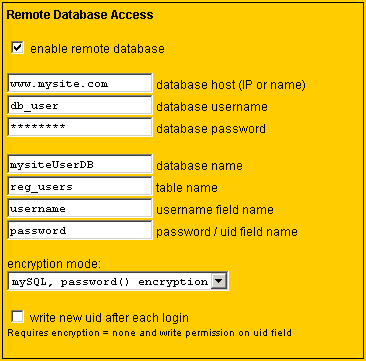
All fields must be filled in and "enable remote database" must be checked in order
to connect. You may enter an IP address or domain name in the "database host" field.
Do not include http:// or any other parts of a url.
Field names refer to columns in your database table. For "password / uid
field name", enter the name of the appropriate column depending on the type of
encryption you are using. (see next section)
Encryption Mode
There are several modes that can be used to protect passwords and prevent
unauthorized use of your chat room. Select the type that works best with
your current system:
 |
mySQL password() encryption
Select this type if you are using a mySQL database and each user's password
has been stored using the mySQL password() function. A user's encrypted password
is sent in the url that launches PULPchat. PULPchat compares the name and
encrypted password in the url to the name and encrypted password in your database.
|
| |
PHP, md5() encryption
Select this option to verify a password that has been encryption using MD5.
PHP has a built-in md5() function but MD5 is available in other scripting
languages, even client-side javascript. A user's encrypted password
is sent in the url that launches PULPchat. PULPchat compares the name and
encrypted password in the url to the name and MD5 encrypted password in your
database.
|
| |
none, compare uid
Select this option if each user in your database has a unique id (uid) that
cannot easily be guessed. In the "password / uid" field, you would enter the
name of the uid column instead of the password column. A user's unique id
is sent in the url that launches PULPchat. PULPchat compares the name and
unique id in the url to name and unique id in your database. With this method,
passwords are never sent and security is improved because there is nothing for
anyone to hack.
For even greater login security, you can enable the "write new uid after each
login" feature. To use this feature, PULPchat must have permission
to write to the uid column of your database. Also notice that you cannot rely
on the uid for any other functions since it will be changing randomly, each time
a user logs in. Because of this, you may want to create a separate column for
this purpose.
|
Create the launch URL
Simply add &user=username&pid=password_or_uid
to the end of your links and PULPchat will connect to your database to verify the
user, then log the user in automatically.
With some ASP or PHP scripting, you can dynamically set the username and pid in the link
so a user who is logged into your site is automatically logged into the chat room.
Require password to be entered again
If so desired, you can require the user to enter their username and password again. This
prevents having to send encrypted passwords in the url. You can also use this option if
users have different usernames for the chat room than they do for their main account.
To use this option, use &pid=1 with no
&user parameter.
Back to Questions